Actions
The Actions section shows all actions available for selection in xSuite Bus Prism and allows you to configure them. Actions in xSuite Bus are routines that can be executed by xSuite Bus. You can manually launch them as a single action, schedule them as a task in the Task Scheduler section or bundle them together with other actions into a workflow.
xSuite Group GmbH delivers xSuite Bus Prism with several standard actions, which can be configured during installation.
Actions are divided into the following subgroups:
Action type | Description |
|---|---|
Data Archiving | Used to archive raw data and transaction data documents. For more information, see Data Archiving. |
Data Im-/Exporter | Used to import or export data to the various connected systems, e.g. xSuite Mailroom. For more information, see Data im-/exporter. |
Document Classification | Used to classify documents, e.g. for xSuite Mailroom. For more information, see Document Classification. |
Document Conversion | Used to convert documents, e.g. to display image files in the xSuite Viewer. For more information, see Document Conversion. |
Document Extraction | Used for data extraction from incoming documents, e.g., for the xSuite Capture process. For more information, see Document extraction. |
System Clean-Up | For xSuite Bus data cleaning. For more information, see System Clean-Up. |
Table Mapping | Serves to match master data, e.g. to generate master data from an SAP system and to provide document extraction in IRISXtract. For more information, see Table Mapping. |
Workflow Execution | For sequential retrieval of master data. For more information, see Workflow Execution. |
When you open the drop-down menu of a subgroup, you will see which actions are available.
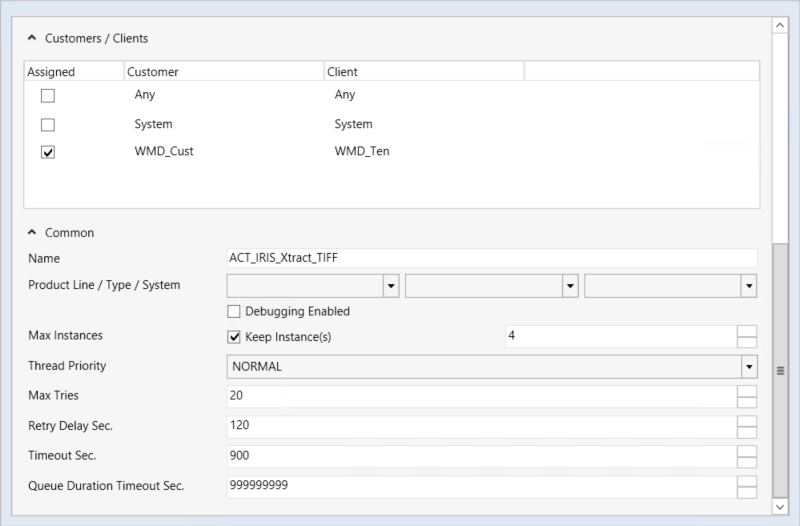
When you select an action from the list, the action’s basic configuration will appear below the list; at the same time, a new section will open to the right, where you perform the actual configuration according to what the different actions require.
 |
Field | Description |
|---|---|
Customer/Clients | Configure the customers and clients that you want to allocate an action to. You can select any of the organizations and users maintained in the Customers Clients tab. If you do not make a selection, the action will apply to all customers and clients. Note: xSuite Interface Prism uses this information for targeted execution of a workflow or an action. |
Common | Specify the naming and sequence of the action. |
Name | Specify the name of the action as it will be shown in the list. |
Product Line/Type/System | Set the values for the filter options. The following values are available for selection for each category:
|
Debugging Enabled | Enable the check box to activate debugging for this action. Any errors that occur can then be traced. This option should only be activated in consultation with xSuite Group GmbH support. |
Max Instances | Specify the maximum number of actions that may be executed in parallel for this type. Check the Keep Instance(s) option to confirm that existing instances will be maintained for additional activities to follow, rather than ended. For IRISXtract, the Keep Instance(s) check box must be activated, otherwise performance problems may occur. |
Thread Priority | Define the priority of the action when opening multiple actions in relation to the maximal number of available threads. |
Max Tries | Define the maximum number of attempts to be made by an action before it signals an error. |
Retry Delay Sec. | Specify the time in seconds that must pass before the system attempts to execute the action again. |
Timeout Sec. | Specify the number of seconds to pass before the action is timed out. |
Queue Duration Timeout Sec. | Specify the number of seconds that an action is to remain in the queue. After a timeout, the item will be deleted, deletion initiated according to the amount of time specified. This item cannot be independently restarted or recovered by the xSuite Bus system anymore. NoticeThe value Queue Duration Timeout Sec. should always be set to a high value at the beginning, e.g., |