Customizing Windows Services users
Notice
This adjustment is only necessary if Windows authentication type was selected during setup.
Open the overview of Windows Services.
➣ The services xSuite Bus Prism Watcher and xSuite Bus Prism Windows Service have the user Local System.

Right-click the entry for one of these two services (for example, xSuite Bus Prism Service Watcher).
Click Properties.
➣ A dialog with the properties of the service will open.
Select the Log On tab.
Select the option This account.
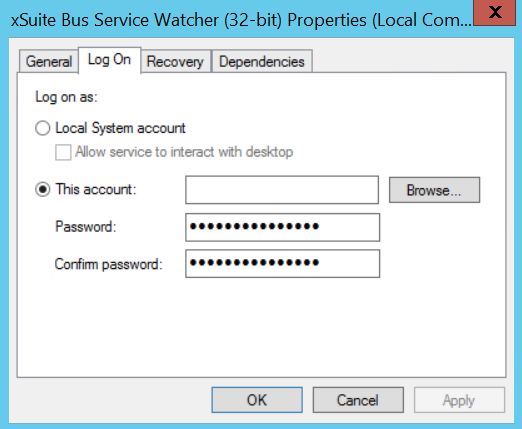
Enter the user data of a user who has the database role
DB_Ownerfor the xSuite Bus database.Click OK.
➣ The user specified is now stored for the service.
Repeat Step 2 to Step 7 for the service that is not yet customized.
Notice
If you add new services in the Suite Bus Management Studio, always adjust the user for these services.