Data im-/exporter
To ensure the communication with the Suite Workflow Engine, the action ACT_Mailroom_ImExport is provided in xSuite Bus. This action may provide a connection to an installed xSuite Workflow Engine via the Suite Connector. It takes on the communication in steps in which the document index data needs to be transferred between xSuite Bus and the xSuite Workflow Engine. An example of this would be setup of a new record in the Workflow Engine or classification of a record.
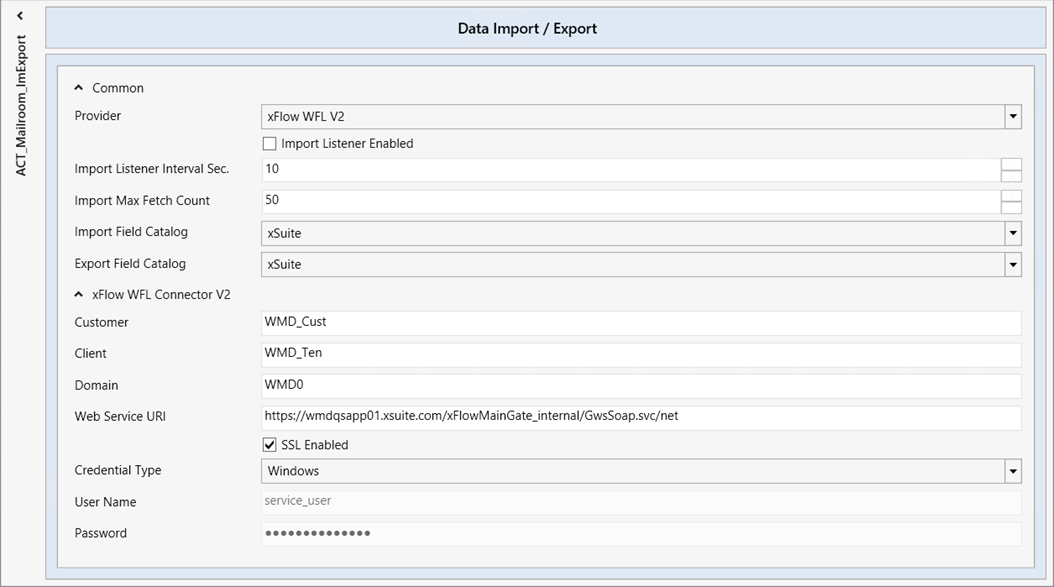
To configure the “Data Im-/Exporter Actions,” You can select your settings from the following options:
 |
Parameter | Description |
|---|---|
Provider |
|
Import Listener Enabled | Turns on the Import Listener function on to monitor whether data is waiting for communication with the xSuite Workflow Engine. The xSuite Workflow Engine is queried at regular intervals. To prevent unnecessary queries from being sent, ensure that the Listener is only activated when a connection to the xSuite Workflow Engine exists. |
Import Listener Interval Sec. | Number of seconds between queries. The default setting is 10 seconds. Please note that the interval set for queries from xSuite Workflow Engine to xSuite Bus is also set to a similar cycle in order to avoid unnecessary communication. |
Import Max Fetch Count | Maximum number of items to be imported simultaneously from xSuite Workflow Engine. |
Import Field Catalog | This is the input field catalog that is used for communication. Only fields from this catalog can be transferred. |
Export Field Catalog | This is the output field catalog that is used for communication. Only fields from this catalog can be transferred. |
Which parameters are available depends on the provider selected.
XML File
Parameter | Description |
|---|---|
Input Path | File path of the XML file that is to be imported. |
Output Path | Location of the XML file after export. |
Backup Path | The file path for the data-extraction results for inspection at a later point in time. Data is stored there until it is deleted by the xSuite Bus System Clean-Up Service. |
Work Path | File path for the data-extraction results for the time at which results are determined. The contents are deleted after the extracted data has been transferred. |
File Extension Trigger | Extension of the XML file that is to be reacted to. Each XML file with this extension is recognized as a new file and the import process is started. The default extension provided is NEW (e.g., |
xSuite WFL Connector V1 and V2
Parameter | Description |
|---|---|
Customer | xSuite Bus customer to be used for the communication. This is not the same as the customer from the tab Customers Clients. Rather, it must be set up in advance in the Workflow Engine. |
Client | xSuite Bus client to be used for the communication. This is not the same as the clients from the tab Customers Clients. Rather, it must be set up in advance in the Workflow Engine. The term used in the Workflow Engine is Tenant. |
Domain | Domain in which the Service User is set up for the communication to the system addressed. |
Web Service URI | Web-URL of the Web Service to be used for the communication. |
SSL Enabled | Turns on the encrypted communication for the Web Service. |
Credential Type | Type of connection of the services that are to be used for the communication with the Web Service. The same type of communication must be entered on the pages of the xSuite Workflow Engine. |
User Name | Name of the service user that is to communicate with the xSuite Workflow Engine. This name must be set up and authorized in the xSuite Workflow Engine as an xSuite Service user. It must be a domain user that owns the domain specified above. Note: If the credential type "Windows" is used, the service on which the action is running may not be operated with the local system account. |
Password | Password of the service user. |
Notice
Applies to xSuite Mailroom:
When an xSuite Mailroom process has been set up, a combination of xSuite Interface, xSuite Bus and xSuite Workflow Engine is recovered. In this case, as the values must be transferred over the entire process, the setup and names for Customer and Client (Tenant in the Workflow Engine) must be the same for all three configurations.
The service on which the communication between xSuite Bus and Workflow Engine runs must be set up with the back-end user and must not run with the local system account.
