Services
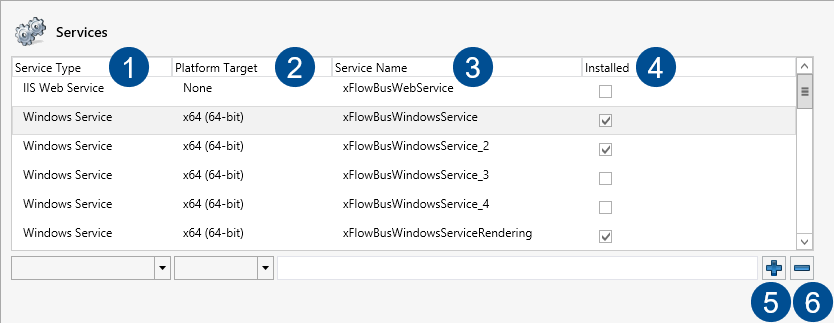
In the Services section, all preconfigured services are listed. This is also where additional services can be installed. When you select a service, you can make additional settings to the service. The items that then appear below will be filled with the settings of the service that has been ticked.
 |
Parameter | Description | |
|---|---|---|
1 | Service Type | Indicates whether the service in question is a Windows Service or a Windows Web Service. Both can be selected in the drop-down menu when a new service is being set up. A Windows Service can be installed and registered as such on the server, whereas a Windows-Web service will be installed as such in the IIS. |
2 | Platform Target | Here, you can set whether the Windows Service is to be 32-bit or 64-bit. This option does not apply to Web services. |
3 | Service Name | Name of the service. When setting up a new service, choose a name that is sufficiently informative that it can be identified easily. This name may not include any empty characters. |
4 | Installed | Indicates whether the service is registered in the list and installed as a service. This is not indicated in Web services. |
5 | Add | After the default settings have been selected, the service can be added to the list. |
6 | Delete | Deletes a service selected from the list. If it has already been installed, it must be uninstalled prior to removal. |