Service Watcher
The Service Watcher is the xSuite Bus Service that monitors and restarts installed services, with or without error messages. The Service Watcher is an independent Windows Service that is set up at installation. To use it for monitoring, it must be put into operation. Go to Service Watcher and make basic settings for this service in the tab Windows IIS Services.
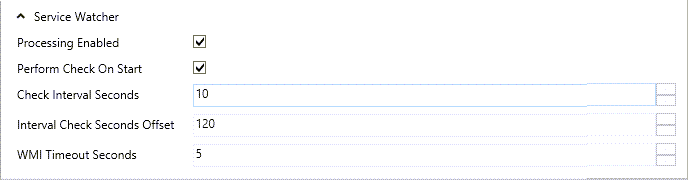 |
Parameter | Description |
|---|---|
Processing Enabled | Tick this box to activate the xSuite Service Watcher and monitor the services assigned it. |
Perform Check on Start | Tick this box to have a check whether all monitored services are running when the xSuite Service Watcher is started up. |
Check Interval Seconds | Enter a number of seconds to define the interval in which the Service Watcher checks whether the services assigned to it are functioning correctly. |
Interval Check Seconds Offset | Enter a number of seconds to define the length of time after a service has been described as suspended before measures must be taken to make it functional again. |
WMI Timeout Seconds | Enter a number of seconds to define when time-out is to be reported if communication to WMI (Windows Management Instrumentation) can be produced. Then the service group can be restarted. |