Licensing
You can also set up management of external licenses in the section Customer Clients. You can check the status of the licenses and set up escalation levels for informing a responsible recipient group by e-mail when a level has been reached.
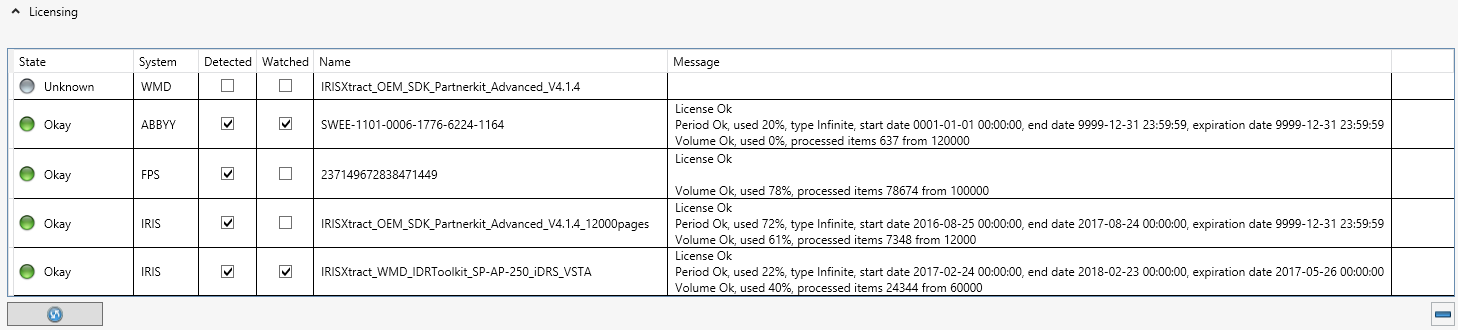
The table shown in the image below displays all recognized licenses and the statuses assigned to them.
Column | Description |
|---|---|
State | Current license status
|
System | Storage location of the recognized license. |
Detected | The system has recognized a license as the current licence in the last query. |
Watched | The license has been earmarked as being under observance. When tagged, licenses are monitored by xSuite Bus Prism. If Escalation Levels is set, messages will be sent to administrators. |
Name | In this column, the name recognized by xSuite Bus is entered. In some cases, only license keys may be recognized. These are entered here. |
Message | Here, the license information received is displayed to the user. Depending on producer, the license status, the duration of the license and the number of records used is displayed. The option Use (Percentage) is the most important piece of information since this percentage will need to be used for the escalation levels in the Escalation Levels. |
Button | Description |
|---|---|
Refresh | Refreshes the license information. xSuite Bus searches for licenses and refreshes the information on licenses that have been identified. |
Remove license | Removes a line that has been earmarked and the license stored from the monitoring functionality of xSuite Bus Prism. The license remains active and applicable but is no longer under observance by xSuite Bus Prism. |
Escalation Levels
In the Escalation Levels section, the administrator can set the xSuite Bus system to automatically send an e-mail when a certain percentage of the license has been used.
The following settings can be made by the administrator to assign the selected e-mail groups to the desired escalation levels:
Parameter | Description |
|---|---|
Escalation Step | Escalation step that xSuite Bus Prism sets for options.
|
Percentage Usage | Use of record volume shown as a percentage. This can be changed by the user, but there are set limits to it.
|
Mail Address Groups | Here, you can enter e-mail recipient groups to be notified when a given escalation level has been reached. Perform the configuration of this method of notification delivery in Settings → Messaging. Creation and maintenance of e-mail distribution groups are also performed here. |