Field Definitions
Configure the definitions of the individual fields bundled in a field catalog here. Select a field catalog in the drop-down menu to see which fields are available for it in the field catalog.
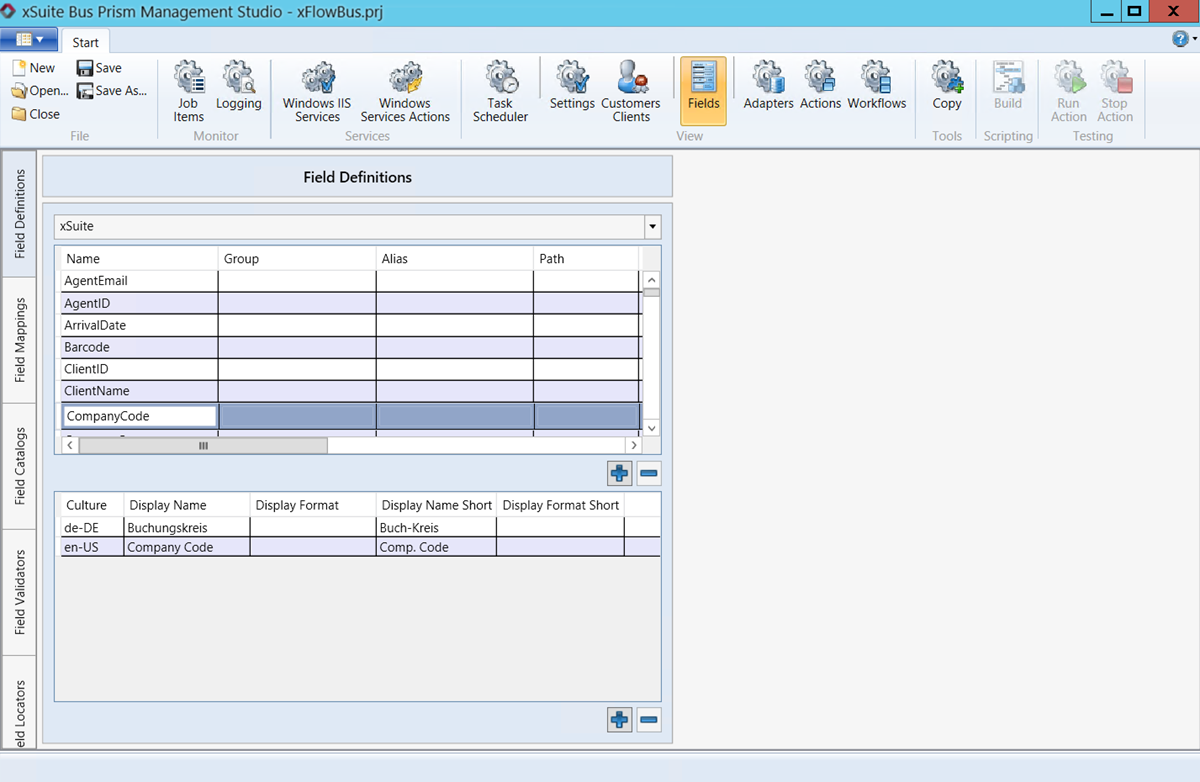 |
The fields are defined by a unique name. You can use the other columns to add more information on the fields. The following columns are available for configuring the field catalog:
Column | Description |
|---|---|
Name | Unique name defined in the field catalog. Can be set as adjustable or fixed, depending on the setting in the field catalog. |
Group | Compilation of a group of fields for the purposes of bundling line-item fields or such. |
Alias | Descriptive name used, for instance, if the field name is fixed. |
Path | Compilation of fields into a collection. For example, a combination of the Debitor and Firstname (Debitor.Firstname) fields. |
Field Type | Microsoft .Net-compliant designation of a file type. |
Category | Field categorization The following options are available:
|
Data Type | Microsoft .Net-based designation of the field’s data type. The following options are available:
|
Mime Type | Describes what format is to be used to display a file if it is included in a field (if a field contains a BLOB). |
Length | Length of the field value. Maximum number of characters, numbers and letters a field may have. The values |
Save Format | Set output format of a field. This is of particular importance when it comes to date fields. Here you can specify that a date is always to be output in the format yyyy-mm-dd (Christmas Eve, 2020, thus being |
Field Attributes | Attributes included with a field. For example, T for a trainable field. |
Multilingual fields
In combination with xSuite Viewer, xSuite Bus Prism can output fields in different languages and formats. When queried, the xSuite Viewer transfers the field value a field value Culture to xSuite Bus. This value must be maintained in xSuite Bus. Provided that this is the case, the Viewer can display date and amount fields in the format set.
In the U.S., numbers are divided with commas and decimal points are used. In Germany, numbers are expressed using points and commas with the exact opposite placement. (In the U.S., 9,999.99 and in Germany 9.999,99.) Dates are also expressed differently (in the U.S.,02/27/1979 and in Germany, 27.02.1979).
Column | Description |
|---|---|
Culture | Value that is transferred from the xSuite Viewer to xSuite Bus. Indicates which languages the field contents are to be displayed in and which output format is expected from xSuite Bus. |
Display Name | Name of the field to be displayed in the table of the xSuite Viewer. |
Display Format | Output format of the field as it is to be transferred to the Viewer. |
Display Name Short | Short name to be displayed for a mouse-over effect. |
Display Format Short | Name of field value to be displayed for a mouse-over effect. |