Overview of filter settings in logging
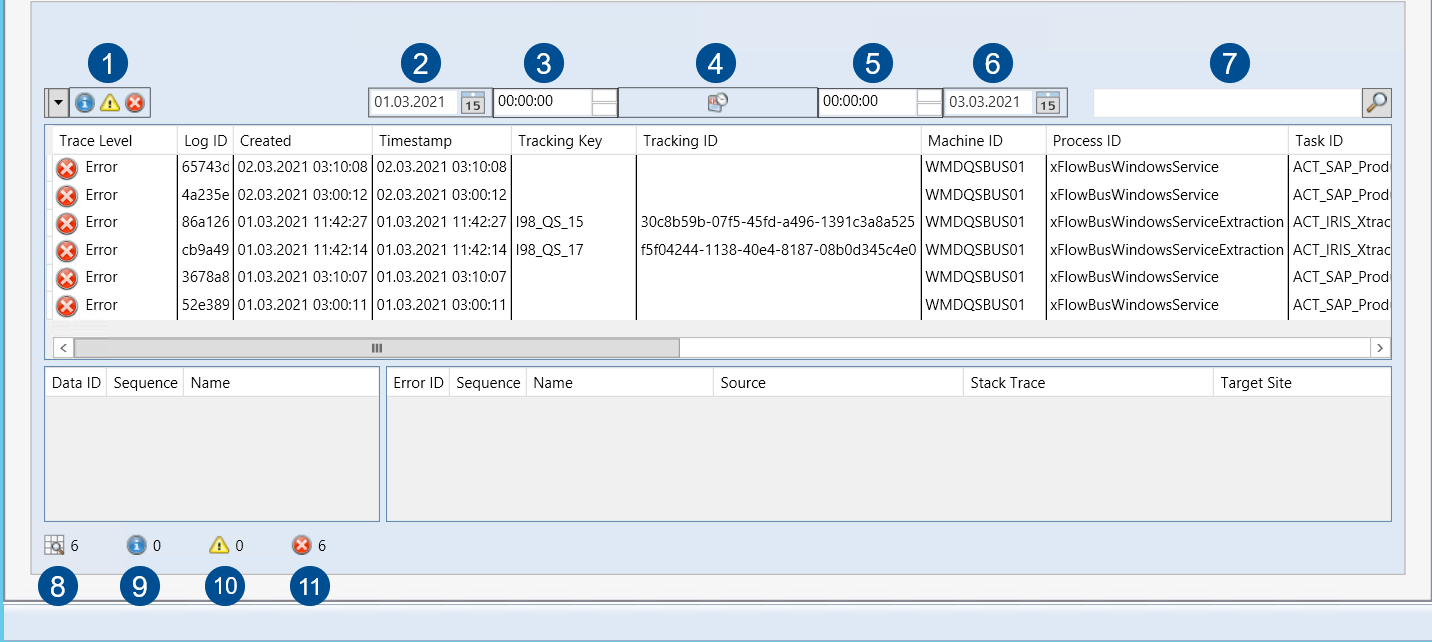
No. | Button Name | Description |
|---|---|---|
1 | Trace Level | These buttons indicate which tracking status an item is in.
|
2 | Start Date | Defines the start date of log entries to be displayed. |
3 | Start Time | Defines the start time of log entries to be displayed. |
4 | Apply Filter | Applies your filter settings to the hit list. |
5 | End Time | Defines the end time of log entries to be displayed. |
6 | End Date | Defines the end date of log entries to be displayed. |
7 | Free-Text Search | Initiates a free-text search across all items in the log. This will cause the system to search all items for matching entries and display them in the hit list. |
8 | All documents | Shows the current number of log items; this number depends on the active filter settings. |
9 | All documents set to “Info” status | Shows the current number of log items with the status Info; this number depends on the active filter settings. |
10 | All documents set to “Warning” status | Shows the current number of log items with the status Warning; this number depends on the active filter settings. |
11 | All documents set to “Error” status | Shows the current number of log items with the status Error; this number depends on the active filter settings. |


