The "Archive" Workspace
All existing archives are displayed in the Archive workspace. You can search any number of archives for specific documents and view the data of these documents in the Document view.
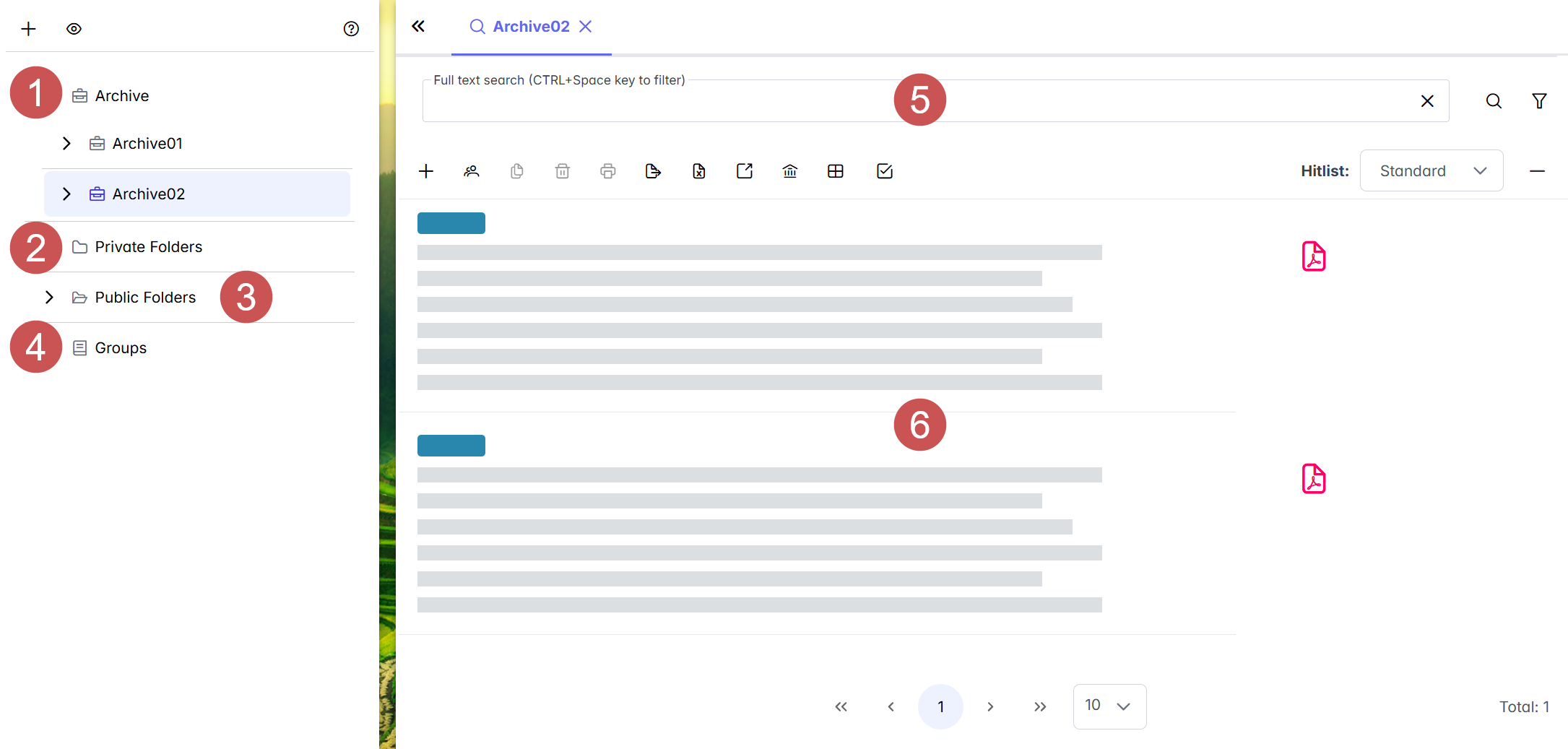 |
The Archive workspace consists of the following elements:
Element | Description | |
|---|---|---|
1 | Archives | All available archives are displayed under Archives. When you click on an archive, the documents in the archive will appear in the hit list. Archives offer the following options: Searching for documents, creating documents, and deleting documents. Archives are managed by the administrator. |
2 | Private folders | Private folders are user-specific. These folders contain documents from different archives. A private folder might contain the documents that you currently have checked out or the documents that you last opened, for example. |
3 | Public folders | Public folders may contain documents from different archives. These documents are visible to all users. All users see the very same documents in the folders. Public folders are created by the administrator. |
4 | Groups | All available archive groupings are displayed under Groups. An archive group contains multiple archives. Archive groups are managed by the administrator. |
5 | Search | The search field and its search options allow different types of document searches. Searches might be full-text searches or index field searches. |
6 | Hit list | The documents from the archives selected are shown in the hit list. When a search is performed, all found documents will appear here. Pre-defined hit lists are available for each archive, group, or folder. Which hit list is selected determines which index data is displayed for the documents. The hit lists available for selection here are defined by the administrator. |