Purchase Order Workflow: Steps
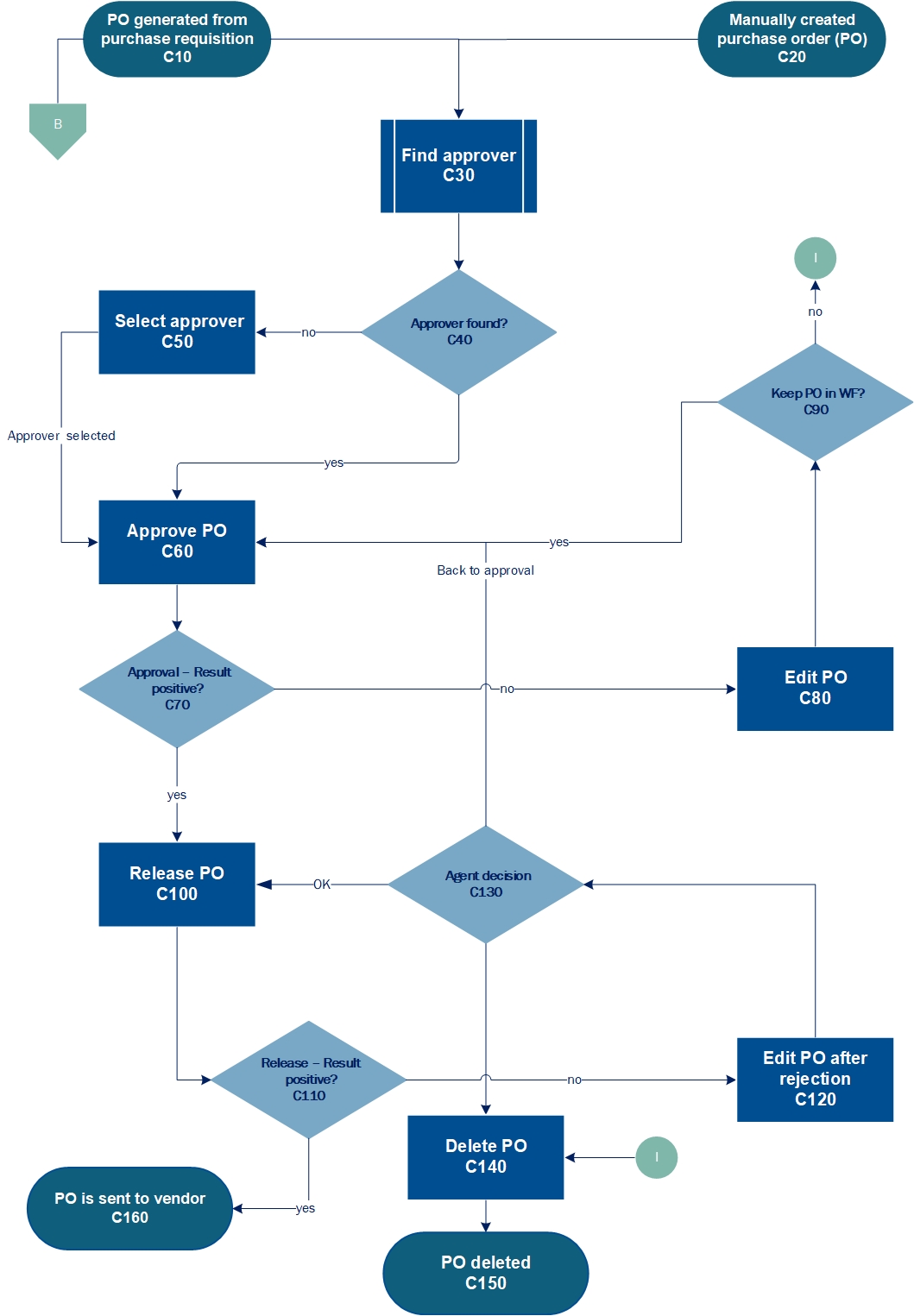 |
Workflow element | Description | Role | |
|---|---|---|---|
C10 | Purchase order (PO) generated from requisition | The purchase order is generated from a released purchase requisition. As such, it originates from the purchase requisition workflow. | PRCR |
C20 | Purchase order created manually | The user creates a manual purchase order. | ––– |
C30 | Find approver | The xSuite Workflow Engine uses the agent determination function to search for an approver. | ––– |
C40 | Approver found? | The approvers that xSuite Workflow Engine finds are derived from the entries available in the agent determination function. If there are no correct entries, the xSuite Workflow Engine will not find any approvers. | ––– |
C50 | Select approver | If the xSuite Workflow Engine does not find any approvers, the agent responsible must select them manually in this step. | POSV |
C60 | Approve purchase order | The approver confirms the details of the purchase order as correct or rejects them as incorrect. | POVA |
C70 | Approval – result positive? | If the agent performing approval confirms the details of the purchase order as correct, then the outcome of the approval step qualifies as positive. The purchase order will then enter the workflow step "Release purchase order" (C100). If the approving agent checks the purchase order and rejects details as incorrect, the workflow will move to the step "Edit purchase order after rejection" (C80). | ––– |
C80 | Edit purchase order | If the approver rejects the purchase order as incorrect, it will be assigned to an agent in the POER role for correction. The agent in the PFER role can correct the header and item data. | POER |
C90 | Keep purchase order in WF? | In this step, the agent decides whether the purchase order is to remain in the workflow. If the decision is to keep the purchase order, it will move to the "Check purchase order" task (C60). If the agent chooses not to edit the purchase order, it will be deleted (C140). | ––– |
C100 | Release purchase order | In the release, an agent releases or rejects the purchase order. If all order items have been released, the purchase order qualifies as released. If any item is rejected, the purchase order qualifies as rejected. | PORE |
C110 | Release – result positive? | In this step, the agent decides whether to release the purchase order. If the purchase order is released, message control will be triggered for the following workflow step. If the purchase order is rejected, it will move to the workflow step "Edit purchase order after rejection" (C120). | ––– |
C120 | Edit purchase order after rejection | If the releaser rejects the purchase order as incorrect, it will be assigned to an agent for correction in the POER role. The agent in the PFER role can correct the header and item data. | POER |
C130 | Agent decision | In this step, the agent has three alternatives: sending the purchase order back to the release step (C100) after editing, sending it to be checked again (C60), or deleting the purchase order (C140). Note: A purchase order cannot be deleted as a whole if it contains any items. Therefore, to delete a purchase order, the user must first delete its constituent items. | ––– |
C140 | Delete purchase order | In the release step (C100), the releaser can write a comment in the comment field requesting that the next agent in line delete the purchase order. The agent handling a rejected purchase order can go directly into the purchase order and delete the items. When all items have been deleted, the order document will be flagged with a deletion indicator. | ––– |
C150 | Purchase order deleted | The deleted purchase order is one potential outcome of the purchase order workflow and the procurement workflow as a whole. | ––– |
C160 | Purchase order sent to vendor | Successful triggering of message control and submission of the purchase order to the supplier is one potential outcome of the purchase order workflow and the procurement workflow as a whole. | ––– |