Purchase Requisition Workflow: Steps
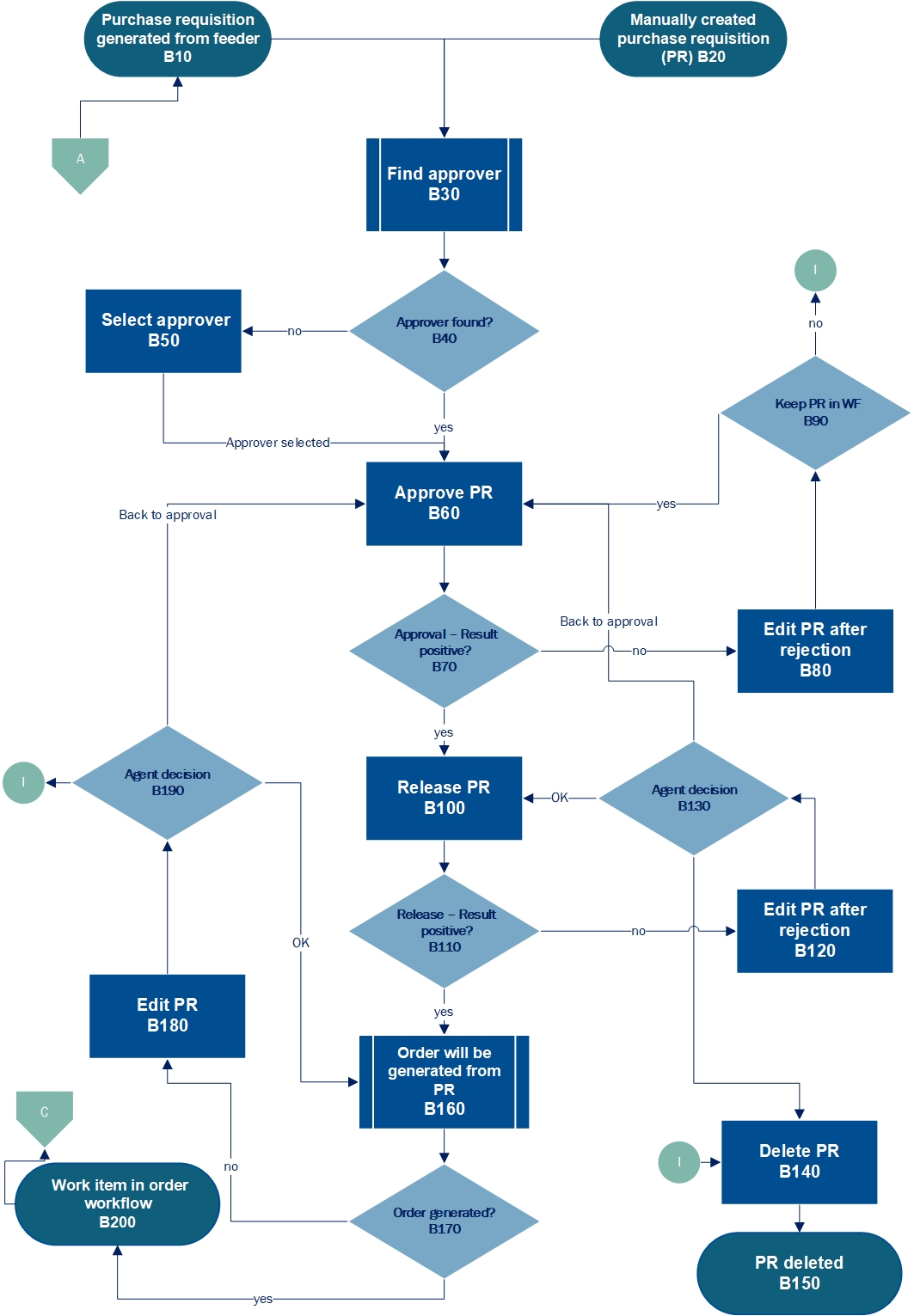 |
Workflow element | Description | Role | |
|---|---|---|---|
B10 | Purchase requisition generated from feeder | The purchase requisition has been generated from a released feeder. | PFCR |
B20 | Purchase requisition created manually | In this step, an agent creates a purchase requisition manually via transaction ME51N in the SAP GUI. | ––– |
B30 | Find approver | The xSuite Workflow Engine uses the agent determination function to search for an approver. | ––– |
B40 | Approver found? | The approvers that xSuite Workflow Engine finds are derived from the entries available in the agent determination function. If there are no correct entries, the xSuite Workflow Engine will not find any approvers. | ––– |
B50 | Select approver | If the xSuite Workflow Engine does not find any approvers, the agent responsible must select them manually in this step. | PRSV |
B60 | Approve purchase requisition | The approver confirms the requisition details as correct or rejects them as incorrect. | PRVA |
B70 | Approval – result positive? | If the agent performing approval confirms the requisition details as correct, then the outcome of the approval step qualifies as positive. The purchase requisition will then enter the workflow step "Release purchase requisition" (B100). In the event of a negative outcome, in which the agent has checked the purchase requisition and rejected details as incorrect, the workflow will move to the step "Edit purchase requisition after rejection" (B80). | ––– |
B80 | Edit purchase requisition after rejection | If the approver rejects requisition details as incorrect, the requisition will be assigned to an agent for correction in the PRER role. The agent in the PFER role can correct the header and item data. | PRER |
B90 | Keep purchase requisition in workflow | Here, the agent decides whether the purchase requisition is to remain in the workflow. If so, the purchase requisition will be sent to the "Approve purchase requisition" task (B60). The agent can also delete the purchase requisition if it does not make sense to edit it (B140). | ––– |
B100 | Release purchase requisition | In this step, an agent releases or rejects the purchase requisition. If all items have been released, the purchase requisition qualifies as released. If any items are rejected, the purchase requisition qualifies as rejected. | PRRE |
B110 | Release – result positive? | In this step, the agent decides whether to release the purchase requisition and send the work item to the workflow step "Purchase order is created from purchase requisition" (B160). In the event of a negative outcome, in which the agent has checked the purchase requisition and rejected details as incorrect, the workflow will move to the step "Edit purchase requisition after rejection" (B120). | ––– |
B120 | Edit purchase requisition after rejection | If the releaser rejects requisition details as incorrect, the requisition is assigned to an agent for correction in the PRER role. The agent in the PFER role can correct the header and item data. | PRER |
B130 | Agent decision | In this step, the agent sends the purchase requisition back to the release step (B100) after editing, or sends it to be checked again (B60). The agent can also delete the purchase requisition if it does not make sense to edit it (B140). | ––– |
B140 | Delete purchase requisition | In the release step (B100), the releaser may have written a comment in the comment field requesting that the next agent in the workflow delete the purchase requisition. In the present step, the agent processing a rejected purchase requisition can delete it from the workflow using the Delete document button. | ––– |
B150 | Purchase requisition deleted | Deletion of the purchase requisition is one potential outcome of the purchase requisition workflow. | ––– |
B160 | Purchase order generated from purchase requisition | Ideally, a purchase order will be generated based on a released purchase requisition. | ––– |
B170 | Purchase order generated? | From this node, the workflow branches depending on whether the system was able to generate the purchase order from the requisition. If the system was unable to generate a purchase order, then the purchase requisition will remain in the purchase requisition workflow, moving into the "Edit purchase requisition" workflow step (B180). A message will inform the user of the reason. | ––– |
B180 | Edit purchase requisition | If a purchase order was not generated, an agent in the PRET role will receive the purchase requisition to edit it. | PRET |
B190 | Agent decision | There are two alternatives between which the agent can decide. One is to click the OK button. This sends the edited purchase requisition to the workflow step for creating a purchase order from the purchase requisition. The other is to return the requisition for review. This is the option to take when the agent making the changes to the requisition is not able to do so, or is not sure whether changes are still within the scope of the approval and release made. | ––– |
B200 | Work item in purchase order workflow | One potential outcome of the purchase requisition workflow is that a purchase order will have been generated. | ––– |