Workflow instances
The overview of workflow instances is a table for monitoring and managing all workflow instances. To open it, click on the tile Workflow Instances on the start page.
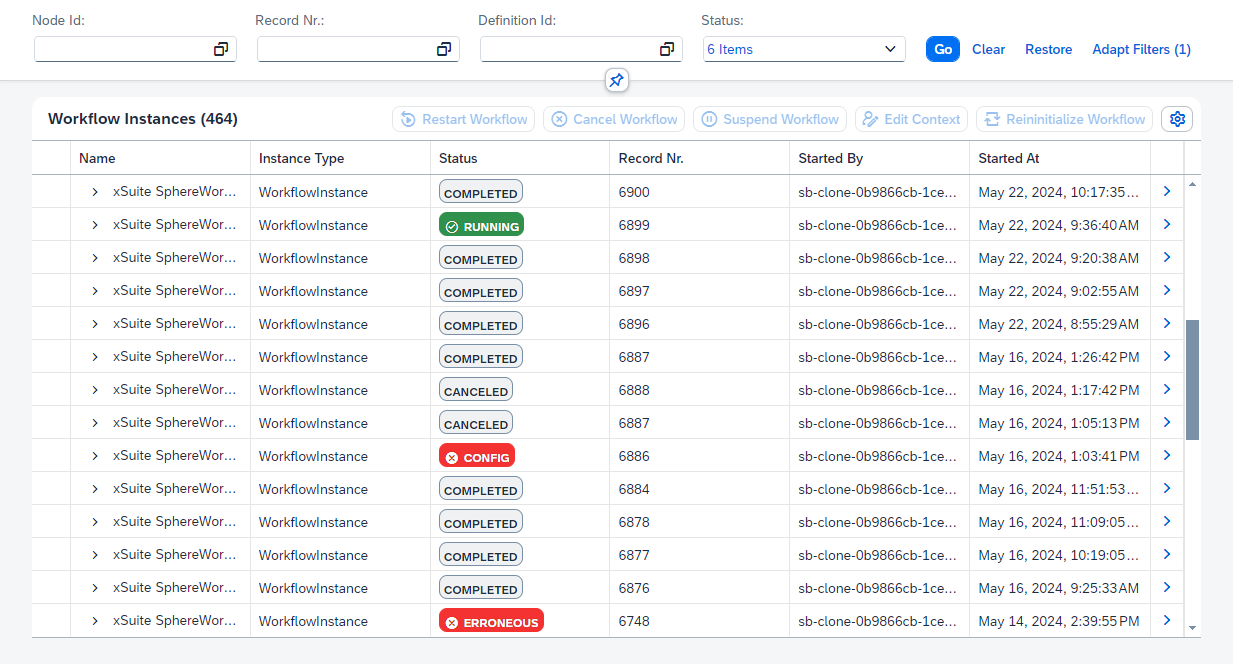 |
[de] Klicken Sie auf der Startseite unter xSuite Workflow auf die Kachel Workflow Instances.
[de] Geben Sie mindestens ein Filterkriterium ein und klicken Sie auf Start.
[de] ➣ Die Workflowinstanzen werden in der Liste angezeigt.
[de] In der Detailansicht der Instanzen können Sie die Daten der Bearbeiterfindung einsehen. Wenn für eine Instanz ein Fehler vorliegt, können Sie die Detailansicht nutzen, um die Ursache des Fehlers zu ermitteln. Sie haben in der Detailansicht außerdem die Möglichkeit, den Workflow für Instanzen neu zu starten, zu pausieren oder abzubrechen.
Workflow instances will always have one of the following statuses:
Status | Description |
|---|---|
| The process was canceled for workflow instances with the status Workflow instances with this status are completed and no further changes are possible. |
| The process was successfully completed for workflow instances with the Workflow instances with this status are completed and no further changes are possible. |
| There is a configuration error for workflow instances with the status NoticeWorkflow instances that have the status |
| There is an error for workflow instances with the status |
| Workflow instances with the status |
| For workflow instances with the status |
Opening a detail view of a workflow instance
The detail view contains general data of the specific workflow instance (e.g., record number, xSuite application, and current workflow task), and any error messages. For more information, see Correcting workflow errors ("Fix Workflow").
Steps
Open the overview of workflow instances.
Enter one or more search criteria and click Go.
➣ The hit list will now display the data of the workflow instances.
Click
 Details at the end of a workflow instance line.
➤ The detail view of the workflow instance will open.