"Edit Confirmation Item" (Role OCET)
The workflow task "Edit confirmation item" involves processing a document that was identified as incorrect in the implicit document check before the workflow was started. If the document does not contain errors, the workflow will start in the approval step. Warnings are permissible and will not affect workflow start.
The agent can change the data of a document is incorrect. After the "Edit document" step has been completed, the document can be corrected using the rejection reasons and returned to the "Approve document" step.
UI – SAP GUI
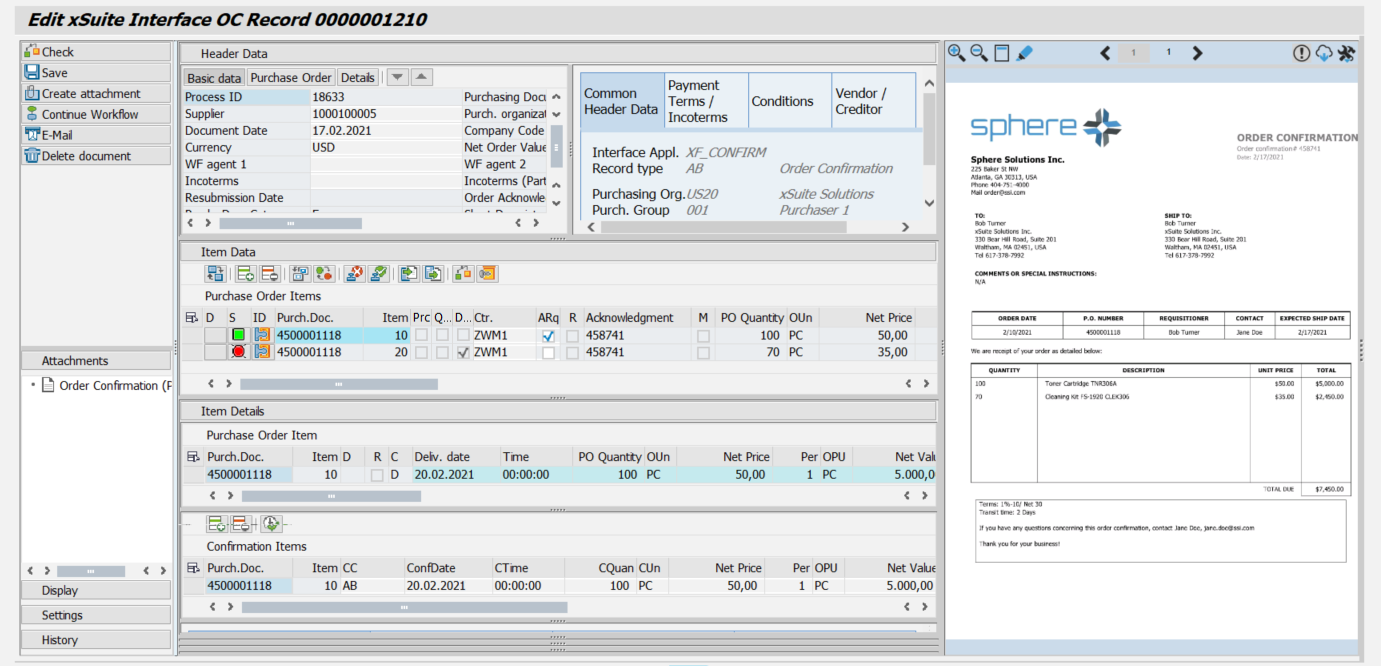 |
UI – SAP Fiori
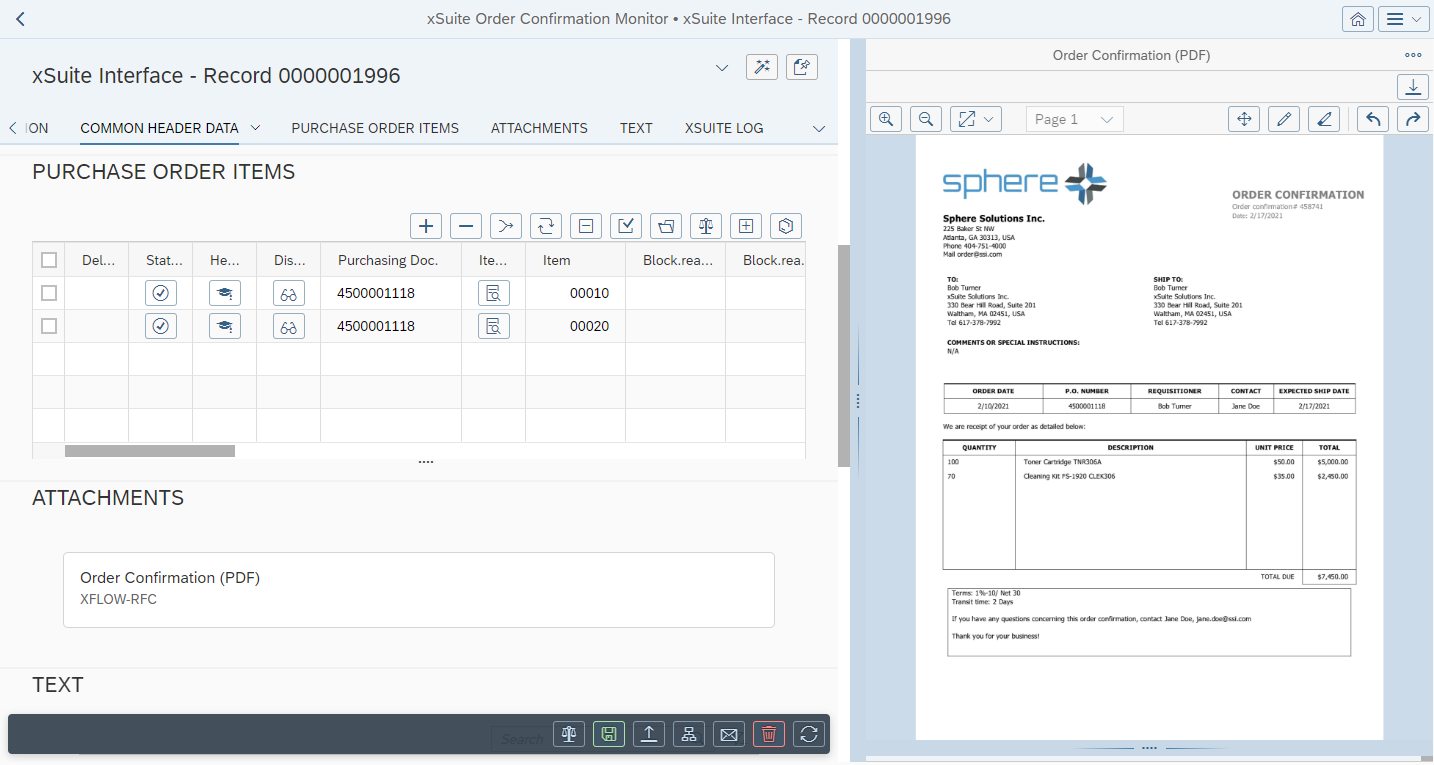 |
For information on the UI elements, see Work Items: Main Overview in the SAP GUI and Work Items: Main Overview in SAP Fiori.
"Edit Confirmation Items": Buttons
SAP Fiori | SAP GUI | Description | |
|---|---|---|---|
| Check | Shortcut in the SAP GUI: F6 | |
| Save | Shortcut in the SAP GUI: F5 | |
 | Create attachment | Shortcut in the SAP GUI: CtrlF11 | |
| Continue Workflow | ||
 | Shortcut in the SAP GUI: CtrlF12 | ||
| Delete document | Sets a deletion flag (in the Order Confirmation Monitor and in the validation screen). If the document is in the workflow, then the workflow will be aborted. The document can be displayed but no longer edited. Once set, the deletion flag cannot be removed. Deleted documents can only be reactivated (Order Confirmation Monitor → | |
| Refresh | Note: This button is only available in SAP Fiori. | |
| Back | Note: This button is only available in SAP Fiori. |


"Edit Confirmation Items": Buttons for Confirmation Items
SAP GUI | SAP Fiori | Name | Description |
|---|---|---|---|
 |  | Add confirmation | Adds a confirmation item. |
 |  | Delete confirmation | Deletes the confirmation items flagged. |
 |  | Transfer | Transfers the data of the confirmation items into the PO item. |
"Edit Confirmation Items": Buttons for Item Data
SAP GUI | SAP Fiori | Name | Description | |
|---|---|---|---|---|
 | --- | Confirmation fields on/off | Determines whether confirmation fields are displayed. The confirmation fields cannot be edited. To edit them, go to the Item Details area. | |
|  | Add PO items | Adds a PO item to the document. | |
|  | Delete PO items | Deletes the PO item selected. | |
 |  | Mix in PO data | Updates all PO items based on the data in the purchase order. | |
 |  | Change PO items | Switches to the editing mode of the PO items. From there, the confirmation data that has already been entered can be assigned to another purchase order. The order data will automatically be mixed in when you exit edit mode. | |
 |  | Set rejection indicator | Serves as cancellation flag for a PO item. Is set for the PO item when the document is posted. | |
 |  | Unset rejection indicator | Removes the cancellation flag from a PO item. Is only possible if the document has not been posted yet. | |
 |  | Confirmation data from PO item | Adopts the confirmation data from one or more selected PO item rows. A confirmation item is created for each schedule line in a PO item. The delivery dates and partial quantities are calculated based on the schedule lines. The remaining data is copied from the PO item. The net item value is calculated accordingly. Confirmation items that have already been entered are overwritten. | |
 |  | Conf. Data => Purchase Order | Transfers certain confirmation data to the respective associated PO item. The following data can be transferred to the PO item:
For information on transferring confirmation data to PO items, see Transferring Confirmation Data to a Purchase Order. | |
 |  | Check items | Checks selected PO items and refreshes the status in the column S (error status). Click the icon in a PO item in the column S to view the warning and/or error messages of a PO item. For information on checking PO items, see Checking PO Items in a Document. | |
|  | Mat. Stock/Requirements List | Calls up the material stock / requirements list of the selected PO item (transaction MD04). |
