Opening the Sales Document Overview / Order Book
Opening the Sales Document Overview in the SAP GUI
Execute the transaction /WMD/XF_OC_ADMIN.
➣ The Selection screen will open.
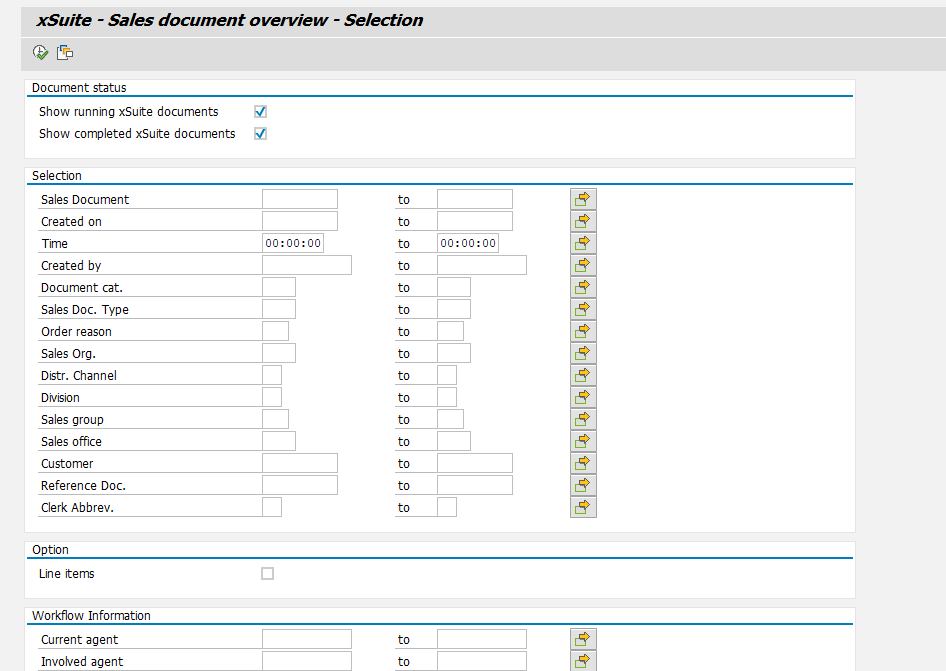
If so needed, narrow down the scope of your search by using the search fields.
For information on search fields, see Sales Document Overview / Order Book: Search Fields.
Click the button
 Execute, or press F8.
➤ The Sales Document Overview will open.
Opening the SD Overview in SAP Fiori
On the SAP Fiori home page, click the SD Overview tile.
➣ The SD Overview will open as the Order Book. The search pane will appear.
Proceed with one of the following steps.
Enter search criteria and click the
 Search button.
➤ The hit list will open. The documents that appear here all correspond to your search criteria.
Click the
 Search button.
➤ The hit list will open. All documents are displayed.
Opening the Order Book in xSuite Web
Open the xSuite Web Business Workplace. For more information, see Opening Your xSuite Web Business Workplace.
Click the button Back to dashboard.
➣ Your dashboard will open.
Click the Order Book tile.
➤ The Order Book (SD Overview) will open.