Target mapping
Create five new target mappings on the gateway system, using Transaction /UI2/FLPD_CUST.
Under Catalogs, select the catalog containing the xSuite App tiles and the corresponding target mapping
In the Target Mapping tab, use the Create Target Mapping button to create five new target mappings in succession.
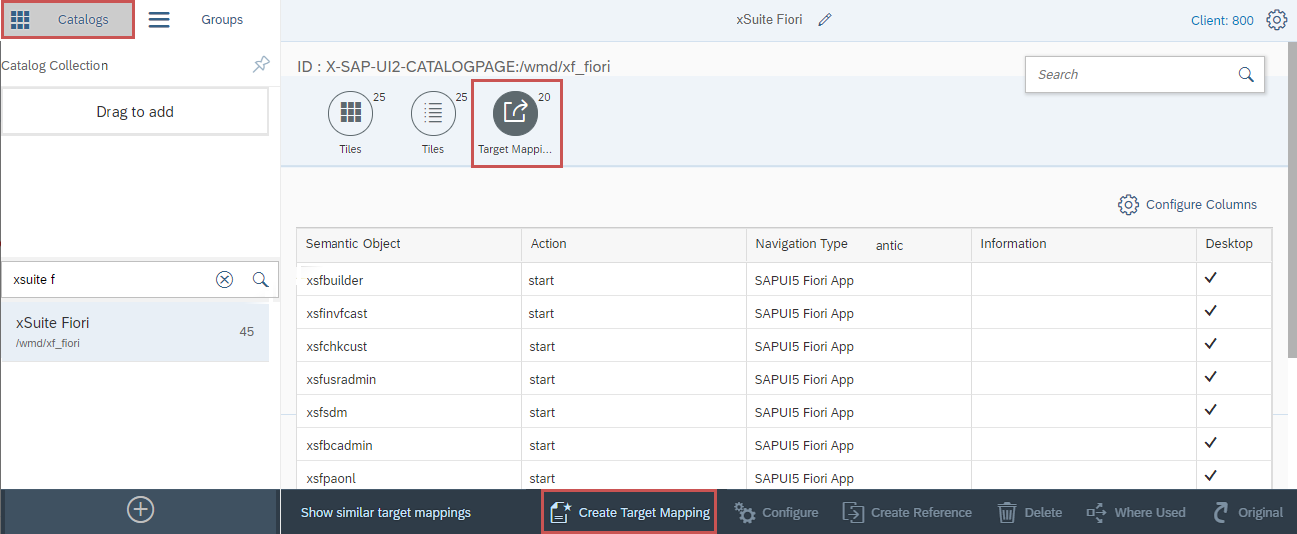 |
Click the Create Target Mapping button to open the Configure: Target mapping view.
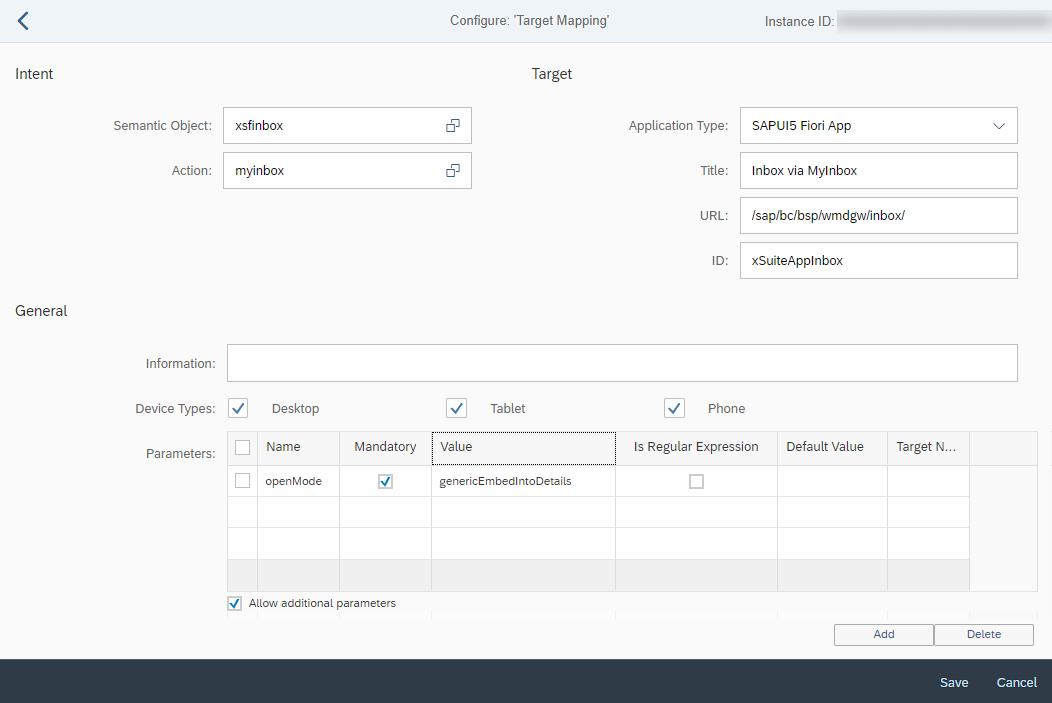 |
All values must be entered according to the following tables. Note that values are case-sensitive.
Notice
The title in the Title field can be selected as desired.
First mapping – xSuite Inbox App
Field | Value | |
|---|---|---|
Semantic Object |
| |
Action |
| |
Application Type |
| |
Title |
| |
URL |
| |
ID |
| |
Device Type | Desktop | activated checkbox |
Tablet | activated checkbox | |
Phone | activated checkbox | |
Parameters | Name |
|
Mandatory | activated checkbox | |
Value |
| |
Is Regular Expression | disabled checkbox | |
Default Value | (Blank) | |
Target Name | (Blank) | |
Allow additional parameters | activated checkbox | |
Second mapping – xSuite Invoice Monitor App
Field | Value | |
|---|---|---|
Semantic Object |
| |
Action |
| |
Application Type |
| |
Title |
| |
URL |
| |
ID |
| |
Device Type | Desktop | activated checkbox |
Tablet | activated checkbox | |
Phone | activated checkbox | |
Parameters | Name |
|
Mandatory | activated checkbox | |
Value |
| |
Is Regular Expression | disabled checkbox | |
Default Value | (Blank) | |
Target Name | (Blank) | |
Allow additional parameters | activated checkbox | |
Third mapping – xSuite Order Confirmation Monitor App
Field | Value | |
|---|---|---|
Semantic Object |
| |
Action |
| |
Application Type |
| |
Title |
| |
URL |
| |
ID |
| |
Device Type | Desktop | activated checkbox |
Tablet | activated checkbox | |
Phone | activated checkbox | |
Parameters | Name |
|
Mandatory | activated checkbox | |
Value |
| |
Is Regular Expression | disabled checkbox | |
Default Value | (Blank) | |
Target Name | (Blank) | |
Allow additional parameters | activated checkbox | |
Fourth mapping – xSuite Sales Document Monitor App
Field | Value | |
|---|---|---|
Semantic Object |
| |
Action |
| |
Application Type |
| |
Title |
| |
URL |
| |
ID |
| |
Device Type | Desktop | activated checkbox |
Tablet | activated checkbox | |
Phone | activated checkbox | |
Parameters | Name |
|
Mandatory | activated checkbox | |
Value |
| |
Is Regular Expression | disabled checkbox | |
Default Value | (Blank) | |
Target Name | (Blank) | |
Allow additional parameters | activated checkbox | |
Fifth mapping – xSuite ArchiveLink Monitor App
Field | Value | |
|---|---|---|
Semantic Object |
| |
Action |
| |
Application Type |
| |
Title |
| |
URL |
| |
ID |
| |
Device Type | Desktop | activated checkbox |
Tablet | activated checkbox | |
Phone | activated checkbox | |
Parameters | Name |
|
Mandatory | activated checkbox | |
Value |
| |
Is Regular Expression | disabled checkbox | |
Default Value | (Blank) | |
Target Name | (Blank) | |
Allow additional parameters | activated checkbox | |