Homepage
Links to call up the active GUI applications are displayed on the homepage. The prerequisite for this is that the applications are hosted in the current program instance of xSuite Interface, in the instance from which the homepage was called.
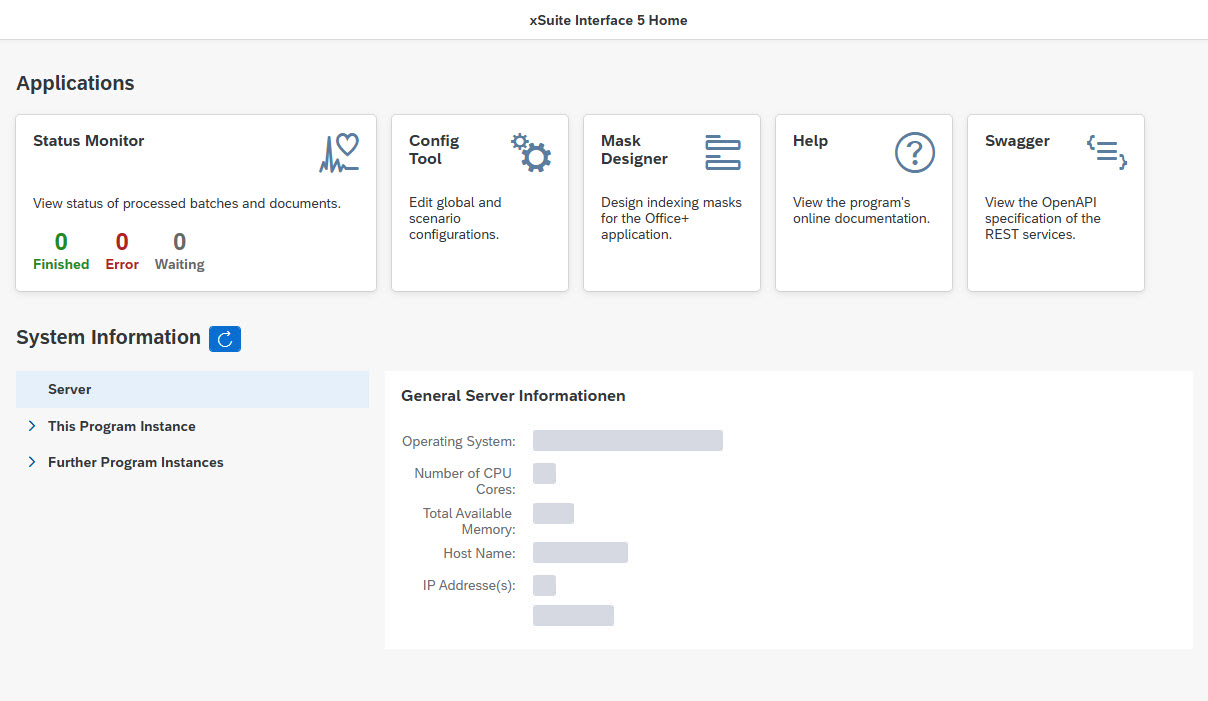 |
The homepage also displays some system information on the server and the current program instance, as well as on any other instances running in parallel.
Calling the Homepage
Notice
The homepage is only available if the web services and the global configuration property WebService.ActivateHomePage are activated.
The homepage is displayed when only the base address from WebService.Url[] and WebService.UrlBasePath is called up without any additional sub-path for a specific application.
The following URL parameters can also be specified in the address:
Parameter | Description |
|---|---|
| On the homepage, the Status Monitor tile will display rudimentary data on the batches that are in the system. By default, this is aggregated data across all tenants that are available in the Status Monitor. The name of the tenant can be defined in this parameter to only include a specific tenant. |
System information display
The display of program instance information depends on how and where these instances are executed.
The current instance is always displayed, and the other instances are identified as follows and in this order:
If the current instance is running on a Windows server, all locally registered Windows services that run the same EXE program file as the current instance are identified.
All instances that have registered with the current instance via the live information transmission function (see global configuration property StatusService.LiveInfo) are read. This is the only way to identify instances running on another server.
All locally running processes that execute the same EXE program file as the current instance are identified. These are exclusively instances that run as console applications, and not instances that run as services.
Specific information about the instances includes information about the running process, the Windows service that starts this process, and some basic data about the global configuration used:
Information about the Windows service is only available if the instance is registered locally as a Windows service.
Information about the current process is only available if the process has actually been started. If the Windows service has been terminated, no information is displayed. For remote instances whose process data cannot be read locally, only live information is displayed. In some cases, live information about an instance is available even though that instance has been terminated. The instance is still displayed, but without process information. For remote instances, a web service is used to check whether the instances are still accessible and the process is still running.
Global configuration data is only available for the current instance, Windows services, and instances registered via live information, as the path to the global configuration file is known in these cases. The file path must always be accessible. This is not always the case with remote instances.
In some cases, instances can be terminated and/or restarted via the homepage:
Functions for starting, terminating, and restarting a Windows service are only available if the instance is registered as a service. For the current instance, only the function for termination is available. Immediately after terminating the current instance, the connection to the web server is terminated. This means that the homepage can no longer be updated.
For processes, functions are available for termination and reinitialization. Reinitialization does not completely terminate the process, but reloads the running web services and worker instances with the current configuration.
These functions are only available if an instance is not started as a Windows service. The commands for terminating and reinitializing are sent via web service call, except for the current instance. To do this, the web services of the target instance must be started (i.e., a URL must be configured) and the web service for the homepage must be active (global configuration property
WebService.ActivateHomePage).Authentication data is not transmitted. This functionality should therefore only be used if other measures are in place to ensure that the unprotected target web service cannot be accessed from outside. The URL under which an instance can be reached to receive commands is determined by the instance itself and transmitted via live information. The instance uses the first entry under the configuration property WebService.Url[] for this purpose. If the entry contains the placeholder
*for the host, this is automatically replaced by the server name. If this does not result in a suitable URL, the desired address must be entered explicitly at the top of the URL list as an alternative.