The Configurator
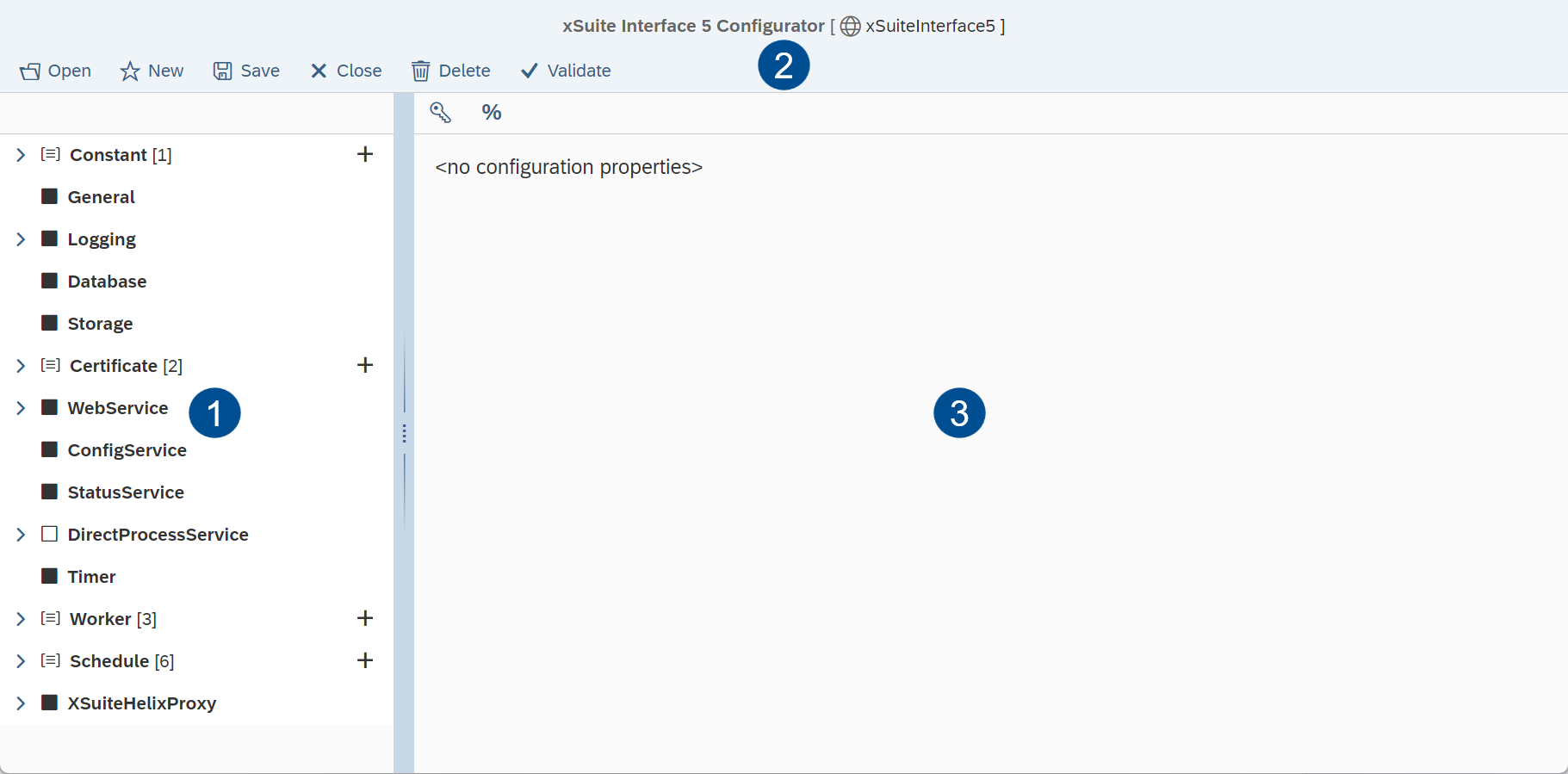
The purpose of the Configurator is to create and edit global configurations and scenario configurations. The user interface of the Configurator is divided into three areas:
 |
Area | Description | |
|---|---|---|
1 | The data of the configuration file is displayed here in a tree structure. The sub-objects of objects in the configuration tree can be expanded and collapsed by clicking on the arrows ( Clicking on an object will display object properties in the configuration form. | |
2 | The options in the toolbar can be used to perform various actions on the configuration currently open, to create new configurations, and to load existing configurations. | |
3 | This pane displays the properties of an object and allows editing of property values. | |

Calling up the Configurator
Notice
To use the configurator, the Config web service must be activated in global configuration.
The address for calling up the Configurator always ends with the fixed URL path /Config. The base address and the base path are based on the configuration at hand (see Web Services):
{Base address}/{Base path}/Config
The following URL parameters can also be specified in the address:
Parameter | Description |
|---|---|
| Activates expert mode when set to Additional buttons are available in expert mode, enabling display of internal data structures (e.g., the JSON representation of the current configuration data). This mode primarily serves the purposes of development and error analysis. |
| Activates read-only mode when set to In read-only mode, loaded configuration files cannot be saved or deleted. This mode is a simple protective measure to prevent accidental changes to configurations that are just called up on the Homepage for the purposes of display. |
| Transfers the technical name of a configuration file from the standard configuration directory. The specified configuration is opened directly when the Configurator is started. The reference must be specified in the URI syntax (see Data Format and Data Sources). For files that are not in the standard configuration directory (directory of the global launch configuration file), specify the full path. Alternatively, if a configuration file is saved elsewhere, the physical path can be transferred. |
| Transfers the name of a configuration file template. The template is loaded directly when the configurator is started. |
A call with additional parameters might look like the following example:
.../Config?ExpertMode=true&Config=TestConfiguration