The "Files" Tab
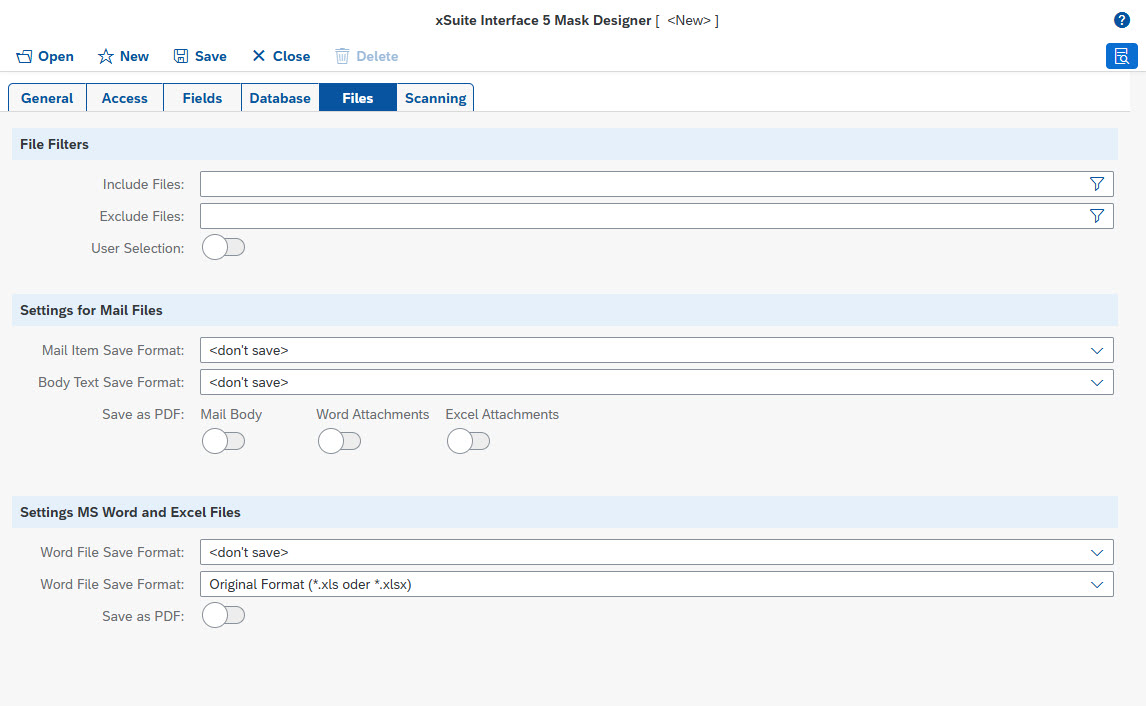 |
File filter
Field | Description |
|---|---|
Include Files Exclude Files | File name filters in the form of wildcard expressions ( If no filters are defined, no restrictions will apply. When listing multiple filters of the same type, separate them with a pipe ( These filters are valid for file attachments that have been added directly by the user, as well as for files that are obtained indirectly through format conversion or extraction of embedded attachments. |
User Selection | Determines whether the user is allowed override restrictions on permitted file types. In principle, all attachments are accepted, but might be flagged as not to be included in the xSuite Interface scenario. The user can remove this flag if so needed. |
Settings for mail files
The embedded file attachments of email files in MSG format and EML format are automatically extracted and added to the document as separate attachments in Office+. This automatic extraction can only be deactivated by setting suitable file filters for attachment file types. The other options for handling email files are listed below.
Notice
The settings for email files and the subsequent settings for Word and Excel files date back to the time when Office+ was still a native add-in for Microsoft Office applications. These settings have been adapted for the use of the Index Client as a standalone web application. The settings can therefore be used in a similar way by adding the respective email or Office file as a file attachment.
The extraction of file attachments and direct format conversion in the Index Client is not necessary for every use case. In many cases, the execution of comparable file macro functions during downstream processing in the main program scenario is sufficient. The extraction of email file attachments in the Index Client is useful if the user is to decide selectively which of the attachments are to be transferred to the main program (e.g., for an archiving process).
Field | Description |
|---|---|
Mail Item Save Format | Storage format in which the original mail object is transferred The original mail object is the MSG file or the EML file. The file can either be transferred in its original format or converted to a different target format. Conversion to a different target format may result in the loss of layout, formatting and/or embedded graphics. In many cases, saving as a PDF can be useful (see Save as PDF). |
Body Text Save Format | Storage format in which the message text is transferred The message text is transferred as a separate file attachment. If the value |
Save as PDF | Determines whether the message text and the embedded Word and Excel files are to be converted to PDF format. The converted files are transferred as additional file attachments. |
Settings for MS Word and Excel files
Field | Description |
|---|---|
Word File Save Format | Determines whether file attachments in Microsoft Word format ( If the file attachments are not transferred in their original format, we recommend activating the Save as PDF option instead. |
Excel File Save Format | Determines whether file attachments in Microsoft Excel format ( If the file attachments are not transferred in their original format, we recommend activating the Save as PDF option instead. |
Save as PDF | Determines whether file attachments in Microsoft Word format and Microsoft Excel format are converted to PDF format. The conversion to PDF format can be carried out in addition to the transfer of the original format or as a replacement of the original files. |