The "Database" Tab
In the Database tab, existing lookup definitions are displayed on the left-hand side. The properties of the currently selected lookup definition are displayed on the right-hand side. Click on the  button to create a copy of the definition selected.
Database queries are primarily used in an indexing mask to automatically fill fields with the result values of these database queries. Multiple lookup definitions can be used in one mask.
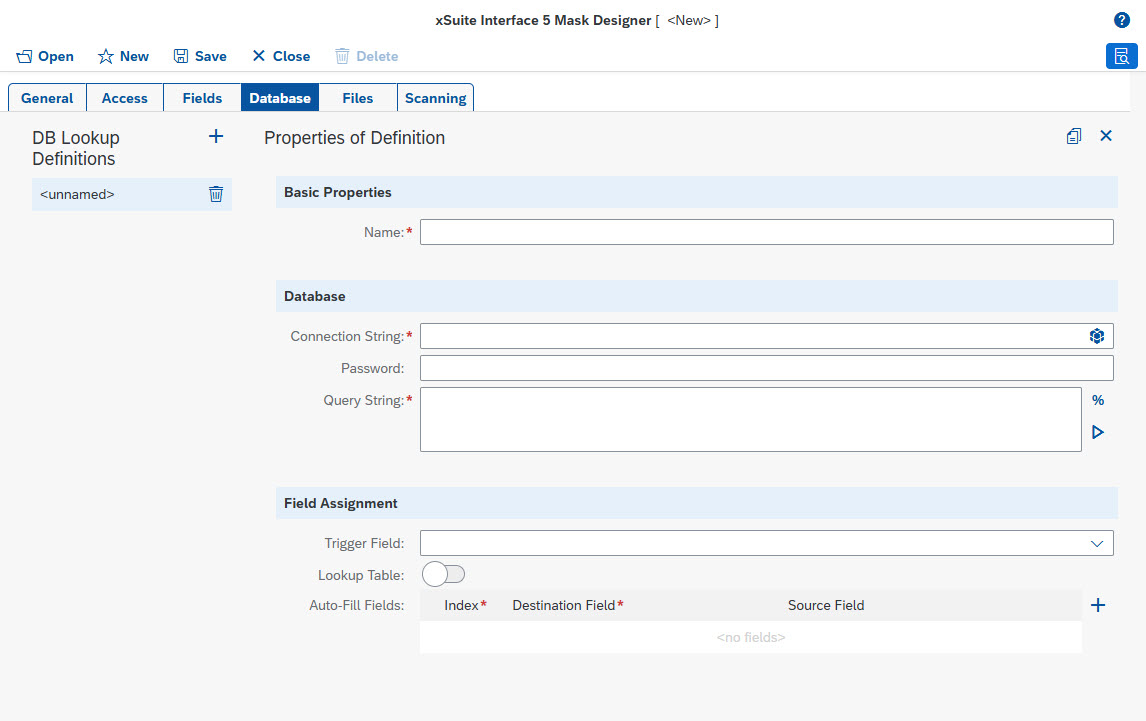 |
Basic properties
Field | Description |
|---|---|
Name | Technical name of the database lookup definition This name is mandatory and must be unique within the mask. |
Database
The same data sources are supported as accessible data sources as in the main program (see External Data Sources). The same syntax must therefore be used here as in the main program for the connection and query strings.
Field | Description |
|---|---|
Connection String | Connection string to the database |
Password | Password required in the connection string The password required in the connection string can be defined separately in |
Query String | The query against the database takes the form of a SELECT statement. To generate dynamic queries in which the current field contents serve as a filter criterion, you can include field variables in the expression. If an OLEDB connection or a native SQL server connection is used, we recommend using typed variables in the form To select the field variables that are defined in the mask, click the To execute the database query as a test, click on the |


Field assignment
Field | Description |
|---|---|
Trigger Field | Name of the field that triggers database access By default, database access is triggered after a field value has been changed. Use this option if you expect a unique query result. This will be the case, for example, if the triggering field represents a unique key that is used as a filter in the query and returns exactly one data record with values for filling other fields. If, on the other hand, the following property Lookup table is set, a button will be displayed next to the field, for the user to actively start the query. The result will be displayed to the user in the form of a table from which they can manually select the desired record. In this table display, the user has the option of drilling further down and sorting results by column. This form of query is designed to offer the user the contents of complete database tables or a roughly pre-filtered subset of them for selection. Multiple database lookup definitions can be assigned to one field. They are executed one after the other. Only one lookup definition can be of the type "lookup table." You can also structure the execution of queries as cascades, i.e., having a field that has been filled with a query result trigger another query based on the result. |
Lookup Table | Determines whether the query result is displayed as a lookup table |
Auto-Fill Fields | Definition of the fields that are automatically filled with the result data record of the query If the triggering field itself is also to be filled, specify this field as well here. Source fields are assigned to target fields via the index number (starting with 1) of the source field in the result data record and the name of the target field. If the list of field assignments has been automatically pre-assigned on the basis of a test database query, the names of the source fields will also be displayed in the list. These names have no technical relevance, but are purely informative. |