Appendix A. Elasticsearch 7 Configuration
Notice
For Elasticsearch 7, xSuite recommends setting the ES_JAVA_HOME variable.
Due to the different system requirements of the two services, always configure as follows:
Open the command line.
Navigate to the
bindirectory of the Elasticsearch 7 installation directory, e.g.cd C:_elastic7\bin.Enter the
elasticsearch-service manager elastic7command.➣ The Elasticsearch 7 configuration manager will open.
Select the JAVA tab.
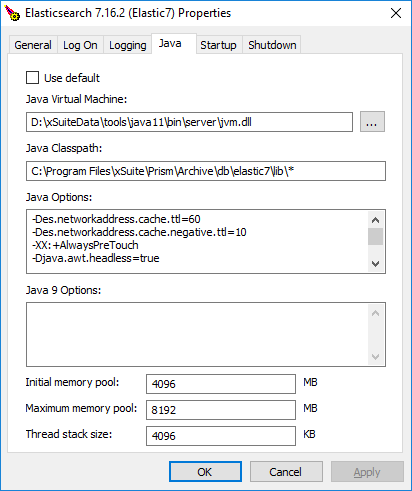
In the JAVA Virtual Machine field, enter the file path to the Java11
jvm.dllfile as shown in this example:installDirJAVA11\bin\server\jvm.dll.In the Maximum memory pool field, enter the value
8192.